Depth Texture Sampling
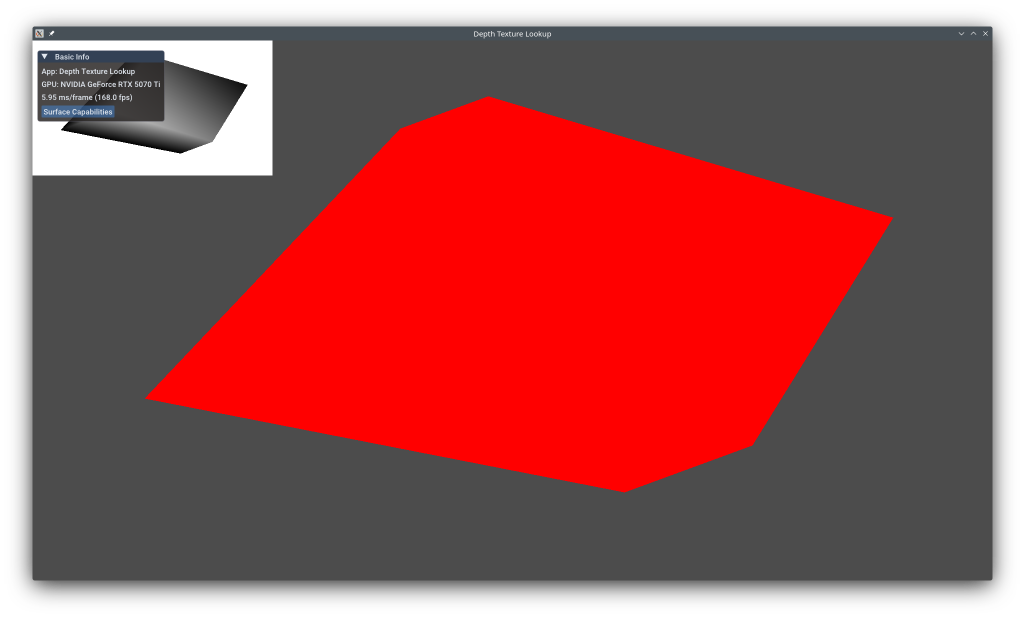
This example shows how to render depth to a texture, then sample from it in subsequent passes. Depth texture sampling enables effects like soft shadows (shadow mapping), depth-of-field, screen-space ambient occlusion (SSAO), edge detection, and depth-aware post-processing. The example renders a cube to populate the depth buffer, samples and visualizes the depth values, then continues rendering.
The example uses the KDGpuExample helper API for simplified setup.
Overview
What this example demonstrates:
- Creating depth textures with sampled usage
- Multi-pass rendering with depth buffer reuse
- Sampling depth textures in fragment shaders
- Depth texture format considerations
- Attachment load/store operations across passes
Use cases:
- Shadow mapping (sampling shadow depth map)
- Screen-space ambient occlusion (SSAO)
- Depth-of-field post-processing
- Edge detection based on depth discontinuities
- Depth visualization and debugging
Vulkan Requirements
- Vulkan Version: 1.0+
- Extensions: None (depth sampling is core)
- Format Features: Depth format must support SampledBit
- Formats: D32_SFLOAT, D24_UNORM_S8_UINT, or D16_UNORM
Key Concepts
Depth Texture Formats:
Depth formats store per-pixel depth values (distance from camera):
D32_SFLOAT: 32-bit float, highest precision, 4 bytes/pixelD24_UNORM_S8_UINT: 24-bit depth + 8-bit stencil, common, 4 bytes/pixelD16_UNORM: 16-bit depth, lower precision, 2 bytes/pixel, mobile-friendly
When sampling depth:
- Use
D32_SFLOAT for best precision (shadow mapping)
- Combined depth-stencil formats require special sampler configuration
- Values are normalized [0, 1]: 0 = near plane, 1 = far plane
Spec: https://registry.khronos.org/vulkan/specs/1.3-extensions/man/html/VkFormat.html
Depth Sampling:
Unlike color textures, depth textures are sampled differently:
| layout(set = 0, binding = 0) uniform sampler2D depthTexture;
void main() {
float depth = texture(depthTexture, uv).r; // Single channel
// depth is in [0, 1]: 0 = near, 1 = far (in NDC space)
}
|
For combined depth-stencil, sampler must specify aspect:
imageAspect = ImageAspectFlagBits::DepthBit to sample depthimageAspect = ImageAspectFlagBits::StencilBit to sample stencil
Image Layout Transitions:
Depth textures use different layouts for different operations:
DepthStencilAttachmentOptimal: Optimal for depth testingShaderReadOnlyOptimal: Optimal for sampling in shadersDepthReadOnlyStencilAttachmentOptimal: Read depth, write stencil
Transitions happen at render pass boundaries via load/store ops.
Implementation
Create Pass 1 to render Cube with Depth:
1
2
3
4
5
6
7
8
9
10
11
12
13
14
15
16
17
18
19
20
21
22
23
24
25
26
27
28
29
30
31
32
33 | // Scene Cube Pass
{
// Create a vertex shader and fragment shader (spir-v only for now)
auto vertexShaderPath = KDGpuExample::assetDir().file("shaders/examples/depth_texture_lookup/cube.vert.spv");
auto vertexShader = m_device.createShaderModule(KDGpuExample::readShaderFile(vertexShaderPath));
auto fragmentShaderPath = KDGpuExample::assetDir().file("shaders/examples/depth_texture_lookup/cube.frag.spv");
auto fragmentShader = m_device.createShaderModule(KDGpuExample::readShaderFile(fragmentShaderPath));
// Create a pipeline layout (array of bind group layouts)
m_rotationPushConstantRange = {
.size = sizeof(glm::mat4),
.shaderStages = ShaderStageFlagBits::VertexBit,
};
m_sceneCubePipelineLayout = m_device.createPipelineLayout(PipelineLayoutOptions{
.pushConstantRanges = {
m_rotationPushConstantRange,
},
});
// Create a pipeline
m_sceneCubePipeline = m_device.createGraphicsPipeline(GraphicsPipelineOptions{
.shaderStages = {
{ .shaderModule = vertexShader, .stage = ShaderStageFlagBits::VertexBit },
{ .shaderModule = fragmentShader, .stage = ShaderStageFlagBits::FragmentBit } },
.layout = m_sceneCubePipelineLayout,
.vertex = {},
.renderTargets = { { .format = m_swapchainFormat } },
.depthStencil = { .format = m_depthFormat, .depthWritesEnabled = true, .depthCompareOperation = CompareOperation::Less },
.primitive = { .topology = PrimitiveTopology::TriangleList },
});
}
|
Filename: depth_texture_lookup/depth_texture_lookup.cpp
Key configuration:
- Color and depth attachments cleared at pass start
- Depth writes enabled in pipeline
- Depth test performs Less comparison
- Result: Depth buffer contains distance values
Create Pass 2 to sample Depth Texture:
 1
 2
 3
 4
 5
 6
 7
 8
 9
10
11
12
13
14
15
16
17
18
19
20
21
22
23
24
25
26
27
28
29
30
31
32
33
34
35
36
37
38
39
40
41
42
43
44
45
46
47
48 | // Depth Lookup Pass
{
// Create a sampler to be used when sampling the detph texture
m_depthTextureSampler = m_device.createSampler();
// Create a vertex shader and fragment shader (spir-v only for now)
auto vertexShaderPath = KDGpuExample::assetDir().file("shaders/examples/depth_texture_lookup/textured_quad.vert.spv");
auto vertexShader = m_device.createShaderModule(KDGpuExample::readShaderFile(vertexShaderPath));
auto fragmentShaderPath = KDGpuExample::assetDir().file("shaders/examples/depth_texture_lookup/textured_quad.frag.spv");
auto fragmentShader = m_device.createShaderModule(KDGpuExample::readShaderFile(fragmentShaderPath));
m_depthLookupBindGroupLayout = m_device.createBindGroupLayout(BindGroupLayoutOptions{
.bindings = {
{
.binding = 0,
.resourceType = ResourceBindingType::CombinedImageSampler,
.shaderStages = ShaderStageFlags(ShaderStageFlagBits::FragmentBit),
},
},
});
// Create a pipeline layout (array of bind group layouts)
m_depthLookupPipelineLayout = m_device.createPipelineLayout(PipelineLayoutOptions{
.bindGroupLayouts = { m_depthLookupBindGroupLayout },
});
m_depthLookupPipeline = m_device.createGraphicsPipeline(GraphicsPipelineOptions{
.shaderStages = {
{ .shaderModule = vertexShader, .stage = ShaderStageFlagBits::VertexBit },
{ .shaderModule = fragmentShader, .stage = ShaderStageFlagBits::FragmentBit } },
.layout = m_depthLookupPipelineLayout,
.vertex = {},
.renderTargets = { { .format = m_swapchainFormat } },
.primitive = { .topology = PrimitiveTopology::TriangleList },
});
// Create a bindGroup to hold the uniform containing the texture and sampler
m_depthTextureBindGroup = m_device.createBindGroup(BindGroupOptions{
.layout = m_depthLookupBindGroupLayout,
.resources = {
{
.binding = 0,
.resource = TextureViewSamplerBinding{ .textureView = m_depthTextureView, .sampler = m_depthTextureSampler },
},
},
});
}
|
Filename: depth_texture_lookup/depth_texture_lookup.cpp
Key points:
- No depth attachment in this pass (depth testing disabled)
- Color cleared to visualize depth values
CombinedImageSampler binding provides depth texture to shader- Shader samples depth and converts to grayscale for visualization
Rendering with Depth:
We first render the scene to fill the depth buffer:
 1
 2
 3
 4
 5
 6
 7
 8
 9
10
11
12
13
14
15
16
17
18
19
20
21
22
23
24
25
26 | // Draw Cube
static float angle = 0.0f;
const float angularSpeed = 3.0f; // degrees per second
const float dt = engine()->deltaTimeSeconds();
angle += angularSpeed * dt;
if (angle > 360.0f)
angle -= 360.0f;
glm::mat4 rotation = glm::rotate(glm::mat4(1.0f), glm::radians(angle), glm::vec3(1.0f, 1.0f, 1.0f));
auto opaquePass = commandRecorder.beginRenderPass(RenderPassCommandRecorderOptions{
.colorAttachments = {
{
.view = m_swapchainViews.at(m_currentSwapchainImageIndex),
.clearValue = { 0.3f, 0.3f, 0.3f, 1.0f },
},
},
.depthStencilAttachment = {
.view = m_depthTextureView,
},
});
opaquePass.setPipeline(m_sceneCubePipeline);
opaquePass.pushConstant(m_rotationPushConstantRange, &rotation);
opaquePass.draw(DrawCommand{ .vertexCount = 36 });
opaquePass.end();
|
Filename: depth_texture_lookup/depth_texture_lookup.cpp
Next we transition the depth texture to sample from it:
 1
 2
 3
 4
 5
 6
 7
 8
 9
10
11
12
13
14
15 | // Only process depth lookup pass fragments once we are sure scene cube fragments have written to the depth buffer
// Transition the depthTexture to a correct readable layout
commandRecorder.textureMemoryBarrier(TextureMemoryBarrierOptions{
.srcStages = PipelineStageFlags(PipelineStageFlagBit::AllGraphicsBit),
.srcMask = AccessFlagBit::DepthStencilAttachmentWriteBit,
.dstStages = PipelineStageFlags(PipelineStageFlagBit::FragmentShaderBit),
.dstMask = AccessFlags(AccessFlagBit::ShaderReadBit),
.oldLayout = m_depthLayout,
.newLayout = TextureLayout::ShaderReadOnlyOptimal,
.texture = m_depthTexture,
.range = {
.aspectMask = TextureAspectFlagBits::DepthBit | TextureAspectFlagBits::StencilBit,
.levelCount = 1,
},
});
|
Filename: depth_texture_lookup/depth_texture_lookup.cpp
Then we can draw our depth buffer:
 1
 2
 3
 4
 5
 6
 7
 8
 9
10
11
12
13
14 | // Draw Quad that displays depth lookup
auto depthLookupPass = commandRecorder.beginRenderPass(RenderPassCommandRecorderOptions{
.colorAttachments = {
{
.view = m_swapchainViews.at(m_currentSwapchainImageIndex),
.loadOperation = AttachmentLoadOperation::Load, // Don't clear color
.initialLayout = TextureLayout::ColorAttachmentOptimal,
},
},
});
depthLookupPass.setPipeline(m_depthLookupPipeline);
depthLookupPass.setBindGroup(0, m_depthTextureBindGroup);
depthLookupPass.draw(DrawCommand{ .vertexCount = 6 });
depthLookupPass.end();
|
Filename: depth_texture_lookup/depth_texture_lookup.cpp
We transition back the depth buffer to a suitable layout for the next frame:
 1
 2
 3
 4
 5
 6
 7
 8
 9
10
11
12
13
14
15
16 | // Layout gets reset when we resize as the depthTexture is recreated
if (m_depthLayout == TextureLayout::Undefined)
m_depthLayout = TextureLayout::DepthStencilAttachmentOptimal;
// Transition the depthTexture back to an appropriate depthBuffer layout
commandRecorder.textureMemoryBarrier(TextureMemoryBarrierOptions{
.srcStages = PipelineStageFlags(PipelineStageFlagBit::BottomOfPipeBit),
.dstStages = PipelineStageFlags(PipelineStageFlagBit::TopOfPipeBit),
.oldLayout = TextureLayout::ShaderReadOnlyOptimal,
.newLayout = m_depthLayout,
.texture = m_depthTexture,
.range = {
.aspectMask = TextureAspectFlagBits::DepthBit | TextureAspectFlagBits::StencilBit,
.levelCount = 1,
},
});
|
Filename: depth_texture_lookup/depth_texture_lookup.cpp
To render the overlay, the final pass continues rendering on top of previous passes with depth testing enabled. It uses loadOperation = Load to preserve existing color and depth data from previous passes. This demonstrates chaining multiple rendering passes that depend on each other's output.
 1
 2
 3
 4
 5
 6
 7
 8
 9
10
11
12
13
14
15
16
17 | auto overlayPass = commandRecorder.beginRenderPass(RenderPassCommandRecorderOptions{
.colorAttachments = {
{
.view = m_swapchainViews.at(m_currentSwapchainImageIndex),
.loadOperation = AttachmentLoadOperation::Load, // Don't clear color
.initialLayout = TextureLayout::ColorAttachmentOptimal,
.finalLayout = TextureLayout::PresentSrc,
},
},
.depthStencilAttachment = {
.view = m_depthTextureView,
.depthLoadOperation = AttachmentLoadOperation::Load, // Load the depth buffer as is, don't clear it
.initialLayout = TextureLayout::DepthStencilAttachmentOptimal,
},
});
renderImGuiOverlay(&opaquePass);
overlayPass.end();
|
Filename: depth_texture_lookup/depth_texture_lookup.cpp
Depth Texture Cost:
- Memory: 1920×1080 D32: ~8MB, D24S8: ~8MB, D16: ~4MB
- Sampling bandwidth: Similar to color textures
- On tile-based GPUs, avoid unnecessary depth texture creation (use subpasses)
Layout Transitions:
- Transitioning between attachment and sampled layouts has cost
- Minimize transitions by batching shadow map renders
- On mobile, keep depth on-chip when possible
Optimization Tips:
- Use D16_UNORM on mobile for bandwidth savings
- For shadow maps, lower resolution depth (1024×1024 often sufficient)
- Consider reverse-Z for better precision distribution
- Use comparison samplers for shadow mapping (hardware PCF)
See Also
Further Reading
Updated on 2026-10-16 at 00:01:13 +0000