Skip to content

Hello Triangle Ray Tracing

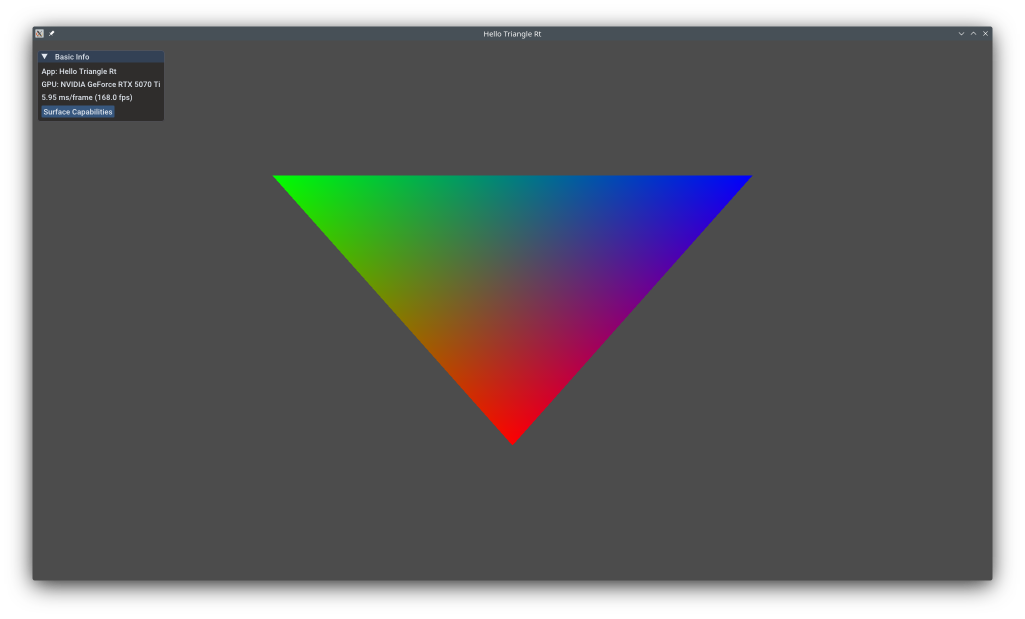
hello_triangle_rt.png

This example shows the fundamentals of Vulkan ray tracing: creating acceleration structures, ray tracing pipelines, shader binding tables, and tracing rays against geometry. Unlike Hello Sphere Ray Tracing which uses custom intersection shaders, this example uses Vulkan's built-in triangle intersection which is highly optimized. This is your starting point for learning modern GPU ray tracing for realistic lighting, reflections, and global illumination.

The example uses the KDGpuExample helper API, demonstrating low-level ray tracing setup.

Overview

What this example demonstrates:

  • Enabling VK_KHR_ray_tracing_pipeline extension
  • Creating bottom-level acceleration structures (BLAS) for triangle geometry
  • Creating top-level acceleration structures (TLAS) for scene instances
  • Ray tracing pipeline with ray generation, miss, and closest-hit shaders
  • Shader binding table (SBT) setup and ray tracing dispatch
  • Writing ray traced output to storage image

Use cases:

  • Realistic lighting and shadows
  • Reflections and refractions
  • Global illumination
  • Ambient occlusion
  • Path tracing

Vulkan Requirements

  • Vulkan Version: 1.2+
  • Extensions:
    • VK_KHR_ray_tracing_pipeline
    • VK_KHR_acceleration_structure
    • VK_KHR_buffer_device_address (required for ray tracing)
    • VK_KHR_deferred_host_operations (optional, for async builds)
  • Features:
    • rayTracingPipeline
    • accelerationStructure
    • bufferDeviceAddress
  • Shader: SPIR-V 1.4+ with ray tracing instructions

Key Concepts

Ray Tracing Pipeline:

Traditional rasterization: Vertices → Rasterization → Fragment Shaders → Pixels

Ray tracing: Rays → Acceleration Structure Traversal → Intersection → Shading

Ray tracing shaders:

  • Ray Generation (.rgen): Launches rays (one per pixel typically)
  • Miss (.rmiss): Executed when ray hits nothing (sky color)
  • Closest Hit (.rchit): Executed on nearest intersection (shading)
  • Any Hit (.rahit): Executed on any intersection (transparency)
  • Intersection (.rint): Custom intersection test (for non-triangles)

Spec: https://registry.khronos.org/vulkan/specs/1.3-extensions/man/html/VK_KHR_ray_tracing_pipeline.html

Acceleration Structures:

Ray-triangle intersection is expensive (O(N) for N triangles). Acceleration structures are BVH (Bounding Volume Hierarchy) trees that accelerate intersection to O(log N).

BLAS (Bottom-Level AS):

  • Contains actual geometry (triangles or AABBs)
  • Built from vertex/index buffers
  • One BLAS per mesh typically
  • Device address used for referencing

TLAS (Top-Level AS):

  • Contains instances of BLAS (transforms + BLAS references)
  • Defines scene layout
  • One TLAS per scene
  • Ray tracing traces against TLAS

Example:

1
2
3
4
TLAS:
  Instance 0: BLAS_cube, transform = translate(1, 0, 0)
  Instance 1: BLAS_cube, transform = translate(-1, 0, 0)
  Instance 2: BLAS_sphere, transform = scale(2)

Spec: https://registry.khronos.org/vulkan/specs/1.3-extensions/man/html/VK_KHR_acceleration_structure.html

Shader Binding Table (SBT):

SBT maps ray tracing shader groups to device memory regions:

1
2
3
4
SBT Layout:
  [Ray Gen Shader 0]
  [Miss Shader 0] [Miss Shader 1] ...
  [Hit Group 0] [Hit Group 1] ...

During tracing, SBT selects which shader to execute based on ray type, geometry hit, etc.

Implementation

Ray Tracing Pipeline

The bind group layout exposes the TLAS and the output storage image to the ray generation shader:

 1
 2
 3
 4
 5
 6
 7
 8
 9
10
11
12
13
14
15
16
17
18
19
20
21
    // Create bind group layout consisting of an acceleration structure and an image to write out to
    const BindGroupLayoutOptions rtBindGroupLayoutOptions = {
        .bindings = {
                {
                        // Acceleration Structure
                        .binding = 0,
                        .count = 1,
                        .resourceType = ResourceBindingType::AccelerationStructure,
                        .shaderStages = ShaderStageFlags(ShaderStageFlagBits::RaygenBit),
                },
                {
                        // Output Image
                        .binding = 1,
                        .count = 1,
                        .resourceType = ResourceBindingType::StorageImage,
                        .shaderStages = ShaderStageFlagBits::RaygenBit | ShaderStageFlagBits::MissBit | ShaderStageFlagBits::ClosestHitBit,
                },
        },
    };

    m_rtBindGroupLayout = m_device.createBindGroupLayout(rtBindGroupLayoutOptions);

Filename: hello_triangle_rt/hello_triangle_rt.cpp

The pipeline brings together all three shader stages and organises them into shader groups. A General group is used for both the ray generation and miss shaders. The closest-hit shader uses TrianglesHit, which tells the driver to use the GPU's built-in hardware triangle intersection unit rather than a custom intersection shader:

 1
 2
 3
 4
 5
 6
 7
 8
 9
10
11
12
13
14
15
16
17
18
19
20
21
22
23
24
25
26
27
28
29
30
31
32
33
34
35
36
37
    // Create a raytracing pipeline
    const RayTracingPipelineOptions pipelineOptions{
        .shaderStages = {
                ShaderStage{
                        .shaderModule = rayTracingGenShader.handle(),
                        .stage = ShaderStageFlagBits::RaygenBit,
                },
                ShaderStage{
                        .shaderModule = rayTracingMissShader.handle(),
                        .stage = ShaderStageFlagBits::MissBit,
                },
                ShaderStage{
                        .shaderModule = rayTracingClosestShader.handle(),
                        .stage = ShaderStageFlagBits::ClosestHitBit,
                },
        },
        .shaderGroups = {
                // Gen
                RayTracingShaderGroupOptions{
                        .type = RayTracingShaderGroupType::General,
                        .generalShaderIndex = 0,
                },
                // Miss
                RayTracingShaderGroupOptions{
                        .type = RayTracingShaderGroupType::General,
                        .generalShaderIndex = 1,
                },
                // Closest Hit
                RayTracingShaderGroupOptions{
                        .type = RayTracingShaderGroupType::TrianglesHit,
                        .closestHitShaderIndex = 2,
                },
        },
        .layout = m_pipelineLayout,
        .maxRecursionDepth = 1,
    };
    m_pipeline = m_device.createRayTracingPipeline(pipelineOptions);

Filename: hello_triangle_rt/hello_triangle_rt.cpp

Key points:

  • RayTracingShaderGroupType::TrianglesHit: delegates intersection to dedicated RT hardware
  • maxRecursionDepth = 1: primary rays only — no recursive bounces

Shader Binding Table

The Shader Binding Table maps the pipeline's shader groups to device memory regions and is used by the traceRays call to select which shaders execute at runtime:

 1
 2
 3
 4
 5
 6
 7
 8
 9
10
11
12
13
    // Create Shader Binding Table
    // This basically allows use to create a selection of ShaderGroups we want to use for a specific trace call
    // e.g which rayGen, which Miss, which Hit group we want to use
    // https://docs.vulkan.org/spec/latest/chapters/raytracing.html#shader-binding-table
    // https://www.willusher.io/graphics/2019/11/20/the-sbt-three-ways
    m_sbt = RayTracingShaderBindingTable(&m_device, RayTracingShaderBindingTableOptions{
                                                            .nbrMissShaders = 1,
                                                            .nbrHitShaders = 1,
                                                    });

    m_sbt.addRayGenShaderGroup(m_pipeline, 0); // So index 0 in our SBT for GenShaders references ShaderGroup 0 of the Pipeline
    m_sbt.addMissShaderGroup(m_pipeline, 1); // So index 0 in our SBT for MissShaders references ShaderGroup 1 of the Pipeline
    m_sbt.addHitShaderGroup(m_pipeline, 2); // So index 0 in our SBT for HitShaders references ShaderGroup 2 of the Pipeline

Filename: hello_triangle_rt/hello_triangle_rt.cpp

Acceleration Structures

Bottom-Level AS (triangle geometry):

AccelerationStructureGeometryTrianglesData describes the vertex buffer layout. The BLAS is sized at creation time and filled during the GPU build step:

 1
 2
 3
 4
 5
 6
 7
 8
 9
10
11
12
13
14
15
16
17
18
19
    const AccelerationStructureGeometryTrianglesData triangleDataGeometry = {
        .vertexFormat = Format::R32G32B32_SFLOAT,
        .vertexData = m_vertexBuffer,
        .vertexStride = sizeof(Vertex),
        .maxVertex = 2, // This is an index not a count
    };

    // Create Acceleration Structures (the TriangleBasedBoundingVolume we will ray trace against)
    m_bottomLevelAs = m_device.createAccelerationStructure(AccelerationStructureOptions{
            .label = "BottomLevelAS",
            .type = AccelerationStructureType::BottomLevel,
            .flags = AccelerationStructureFlagBits::PreferFastTrace,
            .geometryTypesAndCount = {
                    {
                            .geometry = triangleDataGeometry,
                            .maxPrimitiveCount = 1, // We have a single triangles
                    },
            },
    });

Filename: hello_triangle_rt/hello_triangle_rt.cpp

Top-Level AS (scene instances):

The TLAS holds one instance of the BLAS with a scale transform applied. TriangleFacingCullDisable ensures both faces of the triangle are visible:

 1
 2
 3
 4
 5
 6
 7
 8
 9
10
11
12
13
14
15
16
17
18
19
20
21
22
23
24
25
26
27
28
29
    const AccelerationStructureGeometryInstancesData triGeometryInstance{
        .data = {
                AccelerationStructureGeometryInstance{
                        // clang-format off
                        // Apply a top level transform to scale our BottomLevel AS
                        .transform = {
                                0.5f, 0.0f, 0.0f, 0.0f,
                                0.0f, 0.5f, 0.0f, 0.0f,
                                0.0f, 0.0f, 0.5f, 0.0f,
                        },
                        // clang-format on
                        .flags = GeometryInstanceFlagBits::TriangleFacingCullDisable,
                        .accelerationStructure = m_bottomLevelAs,
                },
        },
    };

    // Add the instance information for our AABB
    m_topLevelAs = m_device.createAccelerationStructure(AccelerationStructureOptions{
            .label = "TopLevelAS",
            .type = AccelerationStructureType::TopLevel,
            .flags = AccelerationStructureFlagBits::PreferFastTrace,
            .geometryTypesAndCount = {
                    {
                            .geometry = triGeometryInstance,
                            .maxPrimitiveCount = 1,
                    },
            },
    });

Filename: hello_triangle_rt/hello_triangle_rt.cpp

Building the acceleration structures:

Both structures must be built on the GPU via a command buffer. A memory barrier between the BLAS and TLAS builds is mandatory — failing to synchronize here means the TLAS may read an incomplete BLAS:

 1
 2
 3
 4
 5
 6
 7
 8
 9
10
11
12
13
14
15
16
17
18
19
20
21
22
23
24
25
26
27
28
29
30
31
32
33
34
35
36
37
38
39
40
41
42
43
44
45
46
47
48
49
50
51
52
53
54
55
56
57
58
59
    // Build acceleration structures
    {
        auto commandRecorder = m_device.createCommandRecorder();

        // Bottom Level AS
        commandRecorder.buildAccelerationStructures(BuildAccelerationStructureOptions{
                .buildGeometryInfos = {
                        {
                                .geometries = { triangleDataGeometry },
                                .destinationStructure = m_bottomLevelAs,
                                .buildRangeInfos = {
                                        {
                                                .primitiveCount = 1, // A single triangle
                                                .primitiveOffset = 0,
                                                .firstVertex = 0,
                                                .transformOffset = 0,
                                        },
                                },
                        },
                },
        });

        // Pro Tip: If you don't want to spend days wondering why you have not hits...
        // => Make sure you wait for the bottomLevelAS to have been built prior to building the topLevelAS
        commandRecorder.memoryBarrier(MemoryBarrierOptions{
                .srcStages = PipelineStageFlags(PipelineStageFlagBit::AccelerationStructureBuildBit),
                .dstStages = PipelineStageFlags(PipelineStageFlagBit::AccelerationStructureBuildBit),
                .memoryBarriers = {
                        {
                                .srcMask = AccessFlags(AccessFlagBit::AccelerationStructureWriteBit),
                                .dstMask = AccessFlags(AccessFlagBit::AccelerationStructureReadBit),
                        },
                },
        });

        // Top Level AS
        commandRecorder.buildAccelerationStructures(BuildAccelerationStructureOptions{
                .buildGeometryInfos = {
                        {
                                .geometries = { triGeometryInstance },
                                .destinationStructure = m_topLevelAs,
                                .buildRangeInfos = {
                                        {
                                                .primitiveCount = 1,
                                                .primitiveOffset = 0,
                                                .firstVertex = 0,
                                                .transformOffset = 0,
                                        },
                                },
                        },
                },
        });

        CommandBuffer cmdBuffer = commandRecorder.finish();
        m_queue.submit(SubmitOptions{
                .commandBuffers = { cmdBuffer },
        });
        m_queue.waitUntilIdle();
    }

Filename: hello_triangle_rt/hello_triangle_rt.cpp

Rendering

Each frame the swapchain image is transitioned to General layout so it can be written by the ray generation shader as a storage image. The traceRays call dispatches one ray per pixel using the three SBT regions:

 1
 2
 3
 4
 5
 6
 7
 8
 9
10
11
12
13
14
15
16
17
        auto rtPass = commandRecorder.beginRayTracingPass();
        rtPass.setPipeline(m_pipeline);
        rtPass.setBindGroup(0, m_rtBindGroup);

        // Issue RT Trace call using the SBT table we previously filled
        rtPass.traceRays(RayTracingCommand{
                .raygenShaderBindingTable = m_sbt.rayGenShaderRegion(),
                .missShaderBindingTable = m_sbt.missShaderRegion(),
                .hitShaderBindingTable = m_sbt.hitShaderRegion(),
                .extent = {
                        .width = m_swapchainExtent.width,
                        .height = m_swapchainExtent.height,
                        .depth = 1,
                },
        });

        rtPass.end();

Filename: hello_triangle_rt/hello_triangle_rt.cpp

Ray Tracing Shaders

The pipeline uses three GLSL shaders located under assets/shaders/examples/hello_triangle_rt/.

Ray Generation — raygen.rgen

The ray generation shader fires one ray per pixel with a fixed forward direction (no camera matrix — the triangle lives in NDC space). traceRayEXT traverses the TLAS and the result written by the hit or miss shader is stored into the output image:

 1
 2
 3
 4
 5
 6
 7
 8
 9
10
11
12
13
14
15
16
17
18
19
20
21
22
23
24
25
26
27
28
29
30
31
32
33
34
35
36
#version 460 core
#extension GL_EXT_ray_tracing : enable

layout(location = 0) rayPayloadEXT vec4 payload;

layout(set = 0, binding = 0) uniform accelerationStructureEXT topLevelAS;
layout(set = 0, binding = 1) writeonly uniform image2D img;

void main()
{
    const vec2 pixelCenter = vec2(gl_LaunchIDEXT.xy) + vec2(0.5);
    const vec2 inUV = pixelCenter / vec2(gl_LaunchSizeEXT.xy);
    vec2 d = inUV * 2.0 - 1.0;

    vec3 origin = vec3(d.x, d.y, -1.0f);
    vec3 direction = vec3(0.0, 0.0, 1.0);

    uint rayFlags = gl_RayFlagsNoneEXT;
    float tMin = 0.001;
    float tMax = 1000.0;

    traceRayEXT(topLevelAS, // acceleration structure
                rayFlags, // rayFlags
                0xFF, // cullMask
                0, // sbtRecordOffset
                0, // sbtRecordStride
                0, // missIndex
                origin, // ray origin
                tMin, // ray min range
                direction, // ray direction
                tMax, // ray max range
                0 // payload (location = 0)
    );

    imageStore(img, ivec2(gl_LaunchIDEXT.xy), payload);
}

Filename: hello_triangle_rt/raygen.rgen

Closest Hit — closest.rchit

When the ray intersects the triangle the closest-hit shader runs. hitAttributeEXT vec2 rayAttributes contains the hardware-computed barycentric coordinates (u, v) of the hit point; the third coordinate is derived. The three barycentric weights are mapped directly to RGB to produce the classic multi-coloured triangle:

 1
 2
 3
 4
 5
 6
 7
 8
 9
10
11
#version 460 core
#extension GL_EXT_ray_tracing : enable

layout(location = 0) rayPayloadInEXT vec4 payload;
hitAttributeEXT vec2 rayAttributes;

void main()
{
    const vec3 barycentricCoords = vec3(1.0f - rayAttributes.x - rayAttributes.y, rayAttributes.x, rayAttributes.y);
    payload = vec4(barycentricCoords, 1.0);
}

Filename: hello_triangle_rt/closest.rchit

Miss — miss.rmiss

When no geometry is hit the miss shader writes a flat dark-gray background into the payload:

1
2
3
4
5
6
7
8
9
#version 460 core
#extension GL_EXT_ray_tracing : enable

layout(location = 0) rayPayloadInEXT vec4 payload;

void main()
{
    payload = vec4(vec3(0.3), 1.0);
}

Filename: hello_triangle_rt/miss.rmiss

Performance Notes

Ray Tracing Cost:

  • More expensive than rasterization for primary visibility
  • Excellent for secondary rays (reflections, shadows, GI)
  • AS build cost: ~1-10ms for complex scenes (can be amortized)
  • AS memory: ~10-30% of geometry size

Optimization Tips:

  • Use Opaque flag when possible (skip any-hit)
  • Compact acceleration structures after build (reduces memory)
  • Update TLAS for dynamic objects (cheaper than rebuild)
  • Use ray culling (tMin/tMax, ray masks)
  • Batch rays for coherence (nearby pixels shoot similar rays)

Hardware Requirements:

  • NVIDIA: RTX series (Turing+), dedicated RT cores
  • AMD: RDNA 2+ (RX 6000+), ray accelerators
  • Intel: Arc series (Alchemist+)
  • Mobile: Limited support; check vendor specs

See Also

Further Reading


Updated on 2026-03-31 at 00:02:07 +0000