Skip to content

Render to Texture

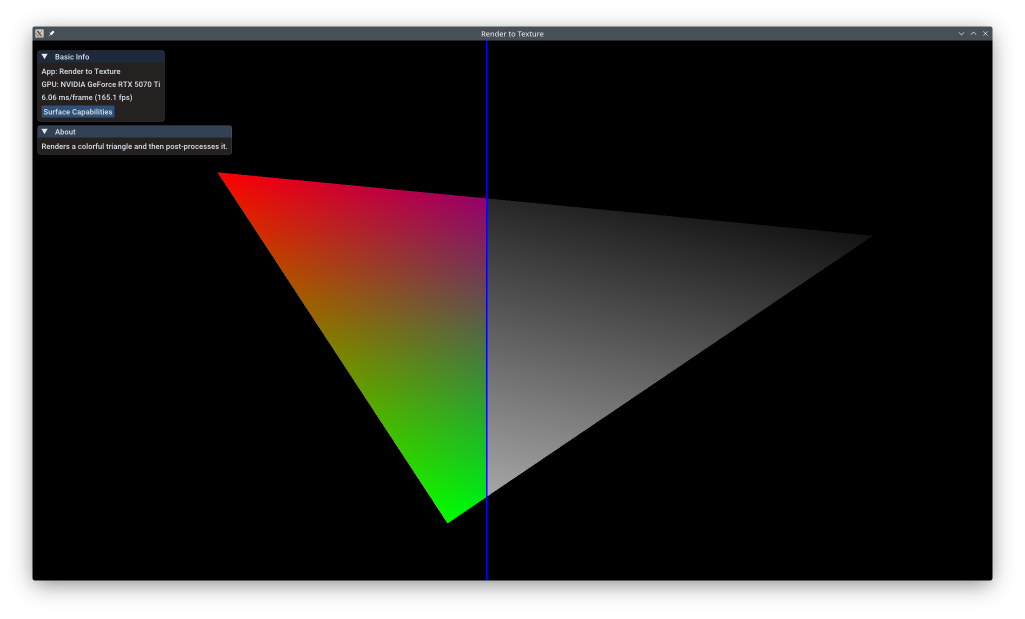
render_to_texture.png

This example shows the fundamental technique of render-to-texture: rendering a scene to an off-screen framebuffer, then using that render as input to subsequent rendering passes. This enables post-processing effects, deferred rendering, reflection/shadow maps, and many other advanced techniques. The example renders a triangle to texture, then applies a post-processing shader with an animated filter.

The example uses the KDGpuExample helper API for simplified setup.

Overview

What this example demonstrates:

  • Creating off-screen render targets (color + depth textures)
  • Multi-pass rendering architecture
  • Sampling from rendered textures in subsequent passes
  • Image layout transitions for different texture uses
  • Full-screen quad rendering for post-processing
  • Push constants for per-draw parameters

Use cases:

  • Post-processing effects (bloom, blur, tone mapping, color grading)
  • Deferred rendering (G-buffer generation)
  • Shadow mapping and reflection maps
  • Screen-space effects (SSAO, SSR)
  • Render-to-cubemap for environment mapping

Vulkan Requirements

  • Vulkan Version: 1.0+
  • Extensions: None (multi-pass rendering is core)
  • Texture Features: SampledBit + ColorAttachmentBit support

Key Concepts

Multi-Pass Rendering:

Instead of rendering directly to the swapchain, we render to intermediate textures that become inputs to later passes:

  • Pass 1: Render scene → Off-screen color texture
  • Pass 2: Sample color texture → Apply effects → Render to swapchain

This architecture enables effects impossible in single-pass rendering.

Image Layouts:

Vulkan textures have different layouts optimized for specific uses:

  • ColorAttachmentOptimal: Optimal for rendering to (as framebuffer attachment)
  • ShaderReadOnlyOptimal: Optimal for sampling from in shaders
  • PresentSrc: Required for presenting to screen

Transitions between layouts happen automatically at render pass boundaries or via explicit barriers.

Spec: https://registry.khronos.org/vulkan/specs/1.3-extensions/man/html/VkImageLayout.html

Full-Screen Quad:

Post-processing typically renders a full-screen quad (two triangles covering viewport) that samples from the input texture. Using triangle strip topology with 4 vertices is efficient:

1
2
Vertices: (-1,1), (1,1), (-1,-1), (1,-1)
Strip draws: v0-v1-v2 (triangle 1), v1-v2-v3 (triangle 2)

Implementation

Creating Off-Screen Render Target:

 1
 2
 3
 4
 5
 6
 7
 8
 9
10
11
12
13
void RenderToTexture::createOffscreenTexture()
{
    const TextureOptions colorTextureOptions = {
        .type = TextureType::TextureType2D,
        .format = m_colorFormat,
        .extent = { m_swapchainExtent.width, m_swapchainExtent.height, 1 },
        .mipLevels = 1,
        .usage = TextureUsageFlagBits::ColorAttachmentBit | TextureUsageFlagBits::SampledBit,
        .memoryUsage = MemoryUsage::GpuOnly
    };
    m_colorOutput = m_device.createTexture(colorTextureOptions);
    m_colorOutputView = m_colorOutput.createView();
}

Filename: render_to_texture/render_to_texture.cpp

Key configuration:

  • usage: ColorAttachmentBit (render to) + SampledBit (sample from)
  • extent: Match swapchain size for 1:1 correspondence
  • memoryUsage: GpuOnly for best performance
  • Depth texture similar, but with DepthStencilAttachmentBit

First Pass - Render Scene:

 1
 2
 3
 4
 5
 6
 7
 8
 9
10
11
12
13
14
15
16
17
18
    // Pass 1: Color pass
    auto opaquePass = commandRecorder.beginRenderPass(KDGpu::RenderPassCommandRecorderOptions{
            .colorAttachments = {
                    {
                            .view = m_colorOutputView, // We always render to the color texture
                            .clearValue = { 0.0f, 0.0f, 0.0f, 1.0f },
                    },
            },
            .depthStencilAttachment = {
                    .view = m_depthTextureView,
            },
    });
    opaquePass.setPipeline(m_pipeline);
    opaquePass.setVertexBuffer(0, m_buffer);
    opaquePass.setIndexBuffer(m_indexBuffer);
    opaquePass.setBindGroup(0, m_transformBindGroup);
    opaquePass.drawIndexed(DrawIndexedCommand{ .indexCount = 3 });
    opaquePass.end();

Filename: render_to_texture/render_to_texture.cpp

This pass renders the main scene (triangle) to m_colorOutputView instead of swapchain. The color texture accumulates the rendering.

Sampler for Texture Access:

1
2
    // Create a sampler we can use to sample from the color texture in the final pass
    m_colorOutputSampler = m_device.createSampler();

Filename: render_to_texture/render_to_texture.cpp

Default sampler provides linear filtering and repeat wrapping. For post-processing, you might want clamp-to-edge wrapping.

Bind Group with Rendered Texture:

 1
 2
 3
 4
 5
 6
 7
 8
 9
10
11
12
13
14
void RenderToTexture::updateColorBindGroup()
{
    // Create a bindGroup to hold the Offscreen Color Texture
    // clang-format off
    const BindGroupOptions bindGroupOptions = {
        .layout = m_colorBindGroupLayout,
        .resources = {{
            .binding = 0,
            .resource = TextureViewSamplerBinding{ .textureView = m_colorOutputView, .sampler = m_colorOutputSampler }
        }}
    };
    // clang-format on
    m_colorBindGroup = m_device.createBindGroup(bindGroupOptions);
}

Filename: render_to_texture/render_to_texture.cpp

The CombinedImageSampler binding makes the first pass's output texture available to the post-process shader.

Post-Process Pipeline with Push Constants:

1
2
3
4
5
    auto vertexShaderPath = KDGpuExample::assetDir().file("shaders/examples/render_to_texture/desaturate.vert.spv");
    auto vertexShader = m_device.createShaderModule(KDGpuExample::readShaderFile(vertexShaderPath));

    auto fragmentShaderPath = KDGpuExample::assetDir().file("shaders/examples/render_to_texture/desaturate.frag.spv");
    auto fragmentShader = m_device.createShaderModule(KDGpuExample::readShaderFile(fragmentShaderPath));

Filename: render_to_texture/render_to_texture.cpp

1
2
3
4
5
6
7
    const BindGroupLayoutOptions bindGroupLayoutOptions = {
        .bindings = {{
            .binding = 0,
            .resourceType = ResourceBindingType::CombinedImageSampler,
            .shaderStages = ShaderStageFlags(ShaderStageFlagBits::FragmentBit)
        }}
    };

Filename: render_to_texture/render_to_texture.cpp

1
2
3
4
    const PipelineLayoutOptions pipelineLayoutOptions = {
        .bindGroupLayouts = { m_colorBindGroupLayout },
        .pushConstantRanges = { m_filterPosPushConstantRange }
    };

Filename: render_to_texture/render_to_texture.cpp

Push constants allow passing small amounts of data (filter position) without creating uniform buffers. Limit is typically 128 bytes.

Triangle Strip for Full-Screen Quad:

1
2
3
        .primitive = {
            .topology = PrimitiveTopology::TriangleStrip
        }

Filename: render_to_texture/render_to_texture.cpp

PrimitiveTopology::TriangleStrip draws connected triangles efficiently - perfect for quads.

Animated Filter Position:

1
2
3
    const float t = engine()->simulationTime().count() / 1.0e9;
    m_filterPos = 0.5f * (std::sin(t) + 1.0f);
    std::memcpy(m_filterPosData.data(), &m_filterPos, sizeof(float));

Filename: render_to_texture/render_to_texture.cpp

Sine wave creates animated line that divides original/processed regions.

Render Loop - Two Passes:

 1
 2
 3
 4
 5
 6
 7
 8
 9
10
11
12
13
14
15
16
17
18
19
20
21
22
23
24
25
26
27
28
29
30
31
32
33
34
35
36
37
38
39
40
41
42
43
44
45
46
47
48
49
50
51
52
53
54
55
56
57
58
59
60
61
62
63
64
65
66
67
68
69
70
    // Pass 1: Color pass
    auto opaquePass = commandRecorder.beginRenderPass(KDGpu::RenderPassCommandRecorderOptions{
            .colorAttachments = {
                    {
                            .view = m_colorOutputView, // We always render to the color texture
                            .clearValue = { 0.0f, 0.0f, 0.0f, 1.0f },
                    },
            },
            .depthStencilAttachment = {
                    .view = m_depthTextureView,
            },
    });
    opaquePass.setPipeline(m_pipeline);
    opaquePass.setVertexBuffer(0, m_buffer);
    opaquePass.setIndexBuffer(m_indexBuffer);
    opaquePass.setBindGroup(0, m_transformBindGroup);
    opaquePass.drawIndexed(DrawIndexedCommand{ .indexCount = 3 });
    opaquePass.end();

    // Wait for Pass1 writes to offscreen texture to have been completed
    // Transition it to a shader read only layout
    commandRecorder.textureMemoryBarrier(TextureMemoryBarrierOptions{
            .srcStages = PipelineStageFlagBit::ColorAttachmentOutputBit,
            .srcMask = AccessFlagBit::ColorAttachmentWriteBit,
            .dstStages = PipelineStageFlagBit::FragmentShaderBit,
            .dstMask = AccessFlagBit::ShaderReadBit,
            .oldLayout = TextureLayout::ColorAttachmentOptimal,
            .newLayout = TextureLayout::ShaderReadOnlyOptimal,
            .texture = m_colorOutput,
            .range = {
                    .aspectMask = TextureAspectFlagBits::ColorBit,
                    .levelCount = 1,
            },
    });

    // Wait for Pass1 writes to depth texture to have been completed
    commandRecorder.textureMemoryBarrier(KDGpu::TextureMemoryBarrierOptions{
            .srcStages = PipelineStageFlagBit::AllGraphicsBit,
            .srcMask = AccessFlagBit::DepthStencilAttachmentWriteBit,
            .dstStages = PipelineStageFlagBit::TopOfPipeBit,
            .dstMask = AccessFlagBit::None,
            .oldLayout = TextureLayout::DepthStencilAttachmentOptimal,
            .newLayout = TextureLayout::DepthStencilAttachmentOptimal,
            .texture = m_depthTexture,
            .range = {
                    .aspectMask = TextureAspectFlagBits::DepthBit | TextureAspectFlagBits::StencilBit,
                    .levelCount = 1,
            },
    });

    // Pass 2: Post process
    auto finalPass = commandRecorder.beginRenderPass(KDGpu::RenderPassCommandRecorderOptions{
            .colorAttachments = {
                    {
                            .view = m_swapchainViews.at(m_currentSwapchainImageIndex),
                            .clearValue = { 0.3f, 0.3f, 0.3f, 1.0f },
                            .finalLayout = TextureLayout::PresentSrc,
                    },
            },
            .depthStencilAttachment = {
                    .view = m_depthTextureView,
            },
    });
    finalPass.setPipeline(m_postProcessPipeline);
    finalPass.setVertexBuffer(0, m_fullScreenQuad);
    finalPass.setBindGroup(0, m_colorBindGroup);
    finalPass.pushConstant(m_filterPosPushConstantRange, m_filterPosData.data());
    finalPass.draw(DrawCommand{ .vertexCount = 4 });
    renderImGuiOverlay(&finalPass);
    finalPass.end();

Filename: render_to_texture/render_to_texture.cpp

Pass 1 always targets the off-screen texture. Pass 2 samples from it and renders to the swapchain for display.

Performance Notes

Memory Cost:

  • Each off-screen texture requires full screen resolution of memory
  • 1920×1080 RGBA8: ~8MB per texture
  • Add depth buffer: +4MB (D24 or D32)
  • Multiple render targets multiply cost

Bandwidth:

  • Writing to off-screen: Full bandwidth
  • Reading in next pass: Full bandwidth again
  • Total: 2× bandwidth vs single-pass
  • Tile-based GPUs (mobile) can optimize this with on-chip tile memory

Pipeline Barriers:

  • Layout transitions have small cost
  • Render pass boundaries handle most transitions automatically
  • Explicit barriers needed for fine control

Optimization Tips:

  • Match render target resolution to needs (don't over-sample)
  • Reuse render targets across frames when possible
  • On mobile, use subpasses instead of separate passes (see Render to Texture with Subpasses)
  • Consider half-resolution for expensive effects (bloom, SSAO)

See Also

Further Reading


Updated on 2026-03-31 at 00:02:07 +0000